A tour of Sable Spend, screen by screen
These are real screens from the iOS app. Here’s what each one does and why we built it that way.
Sable is built around one idea: you should be able to answer any question about your money in a few seconds. Every screen below exists to answer one of those questions — where did it go, am I on budget, when will I hit my goal, what am I worth. Take the tour.
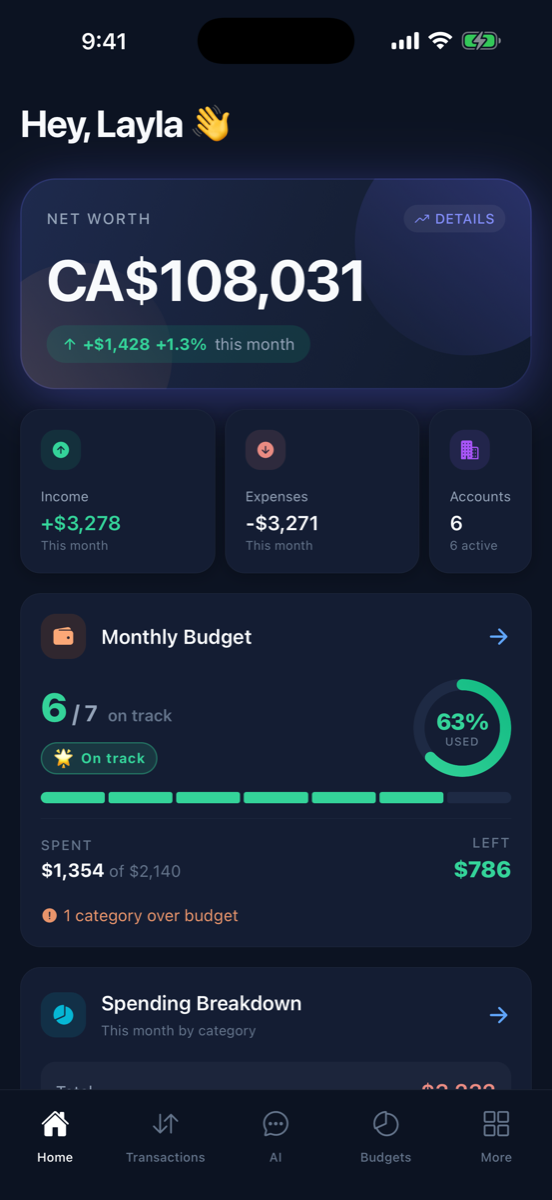
Home: your whole money life on one screen
Open the app and you get the answer to "how am I doing?" without tapping anything. Your net worth sits at the top with this month's change, followed by income and expenses for the month, and a live view of your budgets.
- Net worth with month-over-month change, front and center
- Income vs. expenses for the current month at a glance
- Budget progress ring — how many categories are on track and what's left to spend

Transactions: everything, categorized for you
Every purchase from every linked account lands here automatically, already sorted into categories. Pending charges show up as they happen, and the summary up top nets out what came in against what went out for whatever view you're filtering.
- Auto-categorization out of the box, plus your own custom rules
- Search by merchant or description, filter by account, category, or tag
- Split one receipt across categories, add notes and hashtags
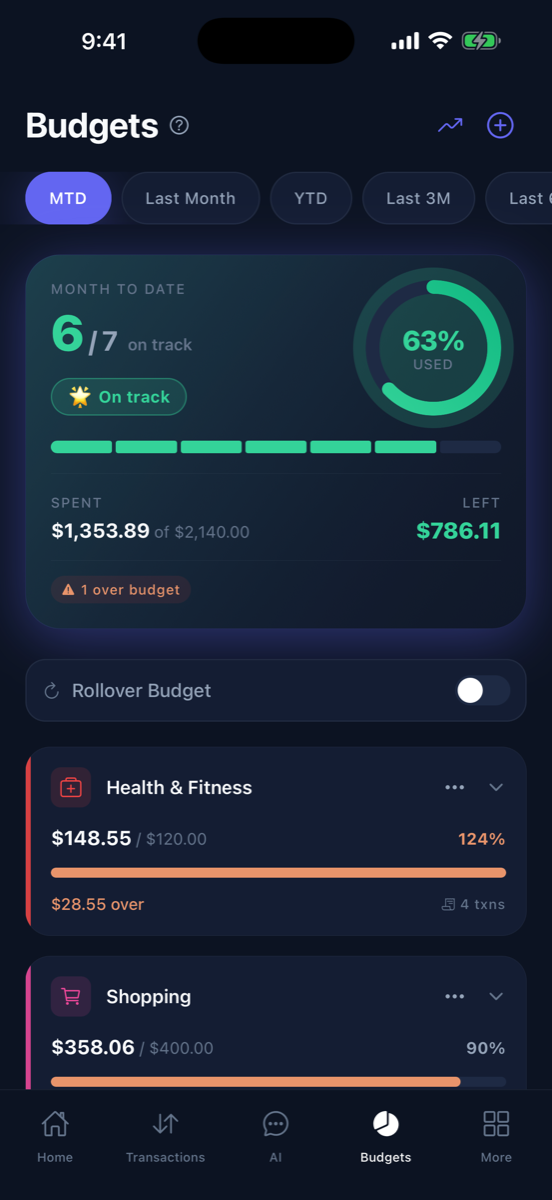
Budgets: know before you overspend
Set a limit per category and watch it fill as the month goes. The overview tells you how many budgets are on track and exactly how much you have left overall — and when a category goes over, it's impossible to miss.
- Month-to-date, last month, YTD, and multi-month views
- Rollover budgets — unspent money carries into next month
- Over-budget categories flagged with exactly how far over you are
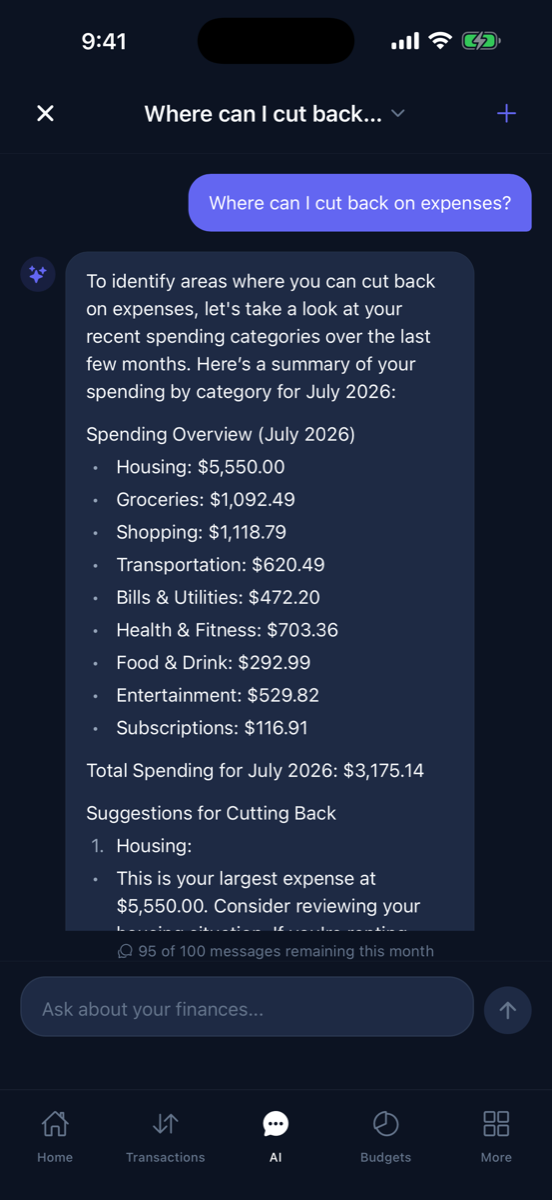
AI assistant: ask your money anything
Ask "where can I cut back?" and the AI reads your actual spending — not generic advice — and comes back with a category-by-category breakdown and specific suggestions. It's like having a financial analyst who has already read your statements.
- Answers come from your real transactions, budgets, and goals
- Plain-English questions, plain-English answers
- Included on the Special plan and up
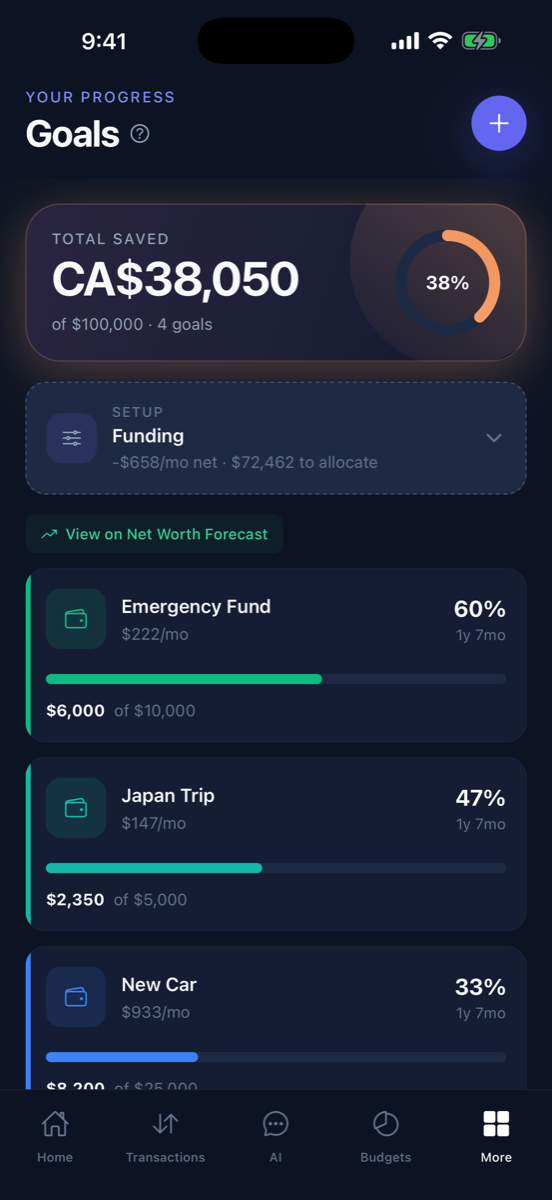
Goals: give every dollar a finish line
Create a goal, set a target, and Sable tracks your progress and tells you when you'll get there at your current pace. The funding setup shows how much of your monthly net is allocated, so "someday" becomes an actual date.
- Per-goal monthly contribution and time-to-goal estimates
- Total saved across all goals with overall progress
- Goals feed directly into your net worth forecast
Reports: see where it actually goes
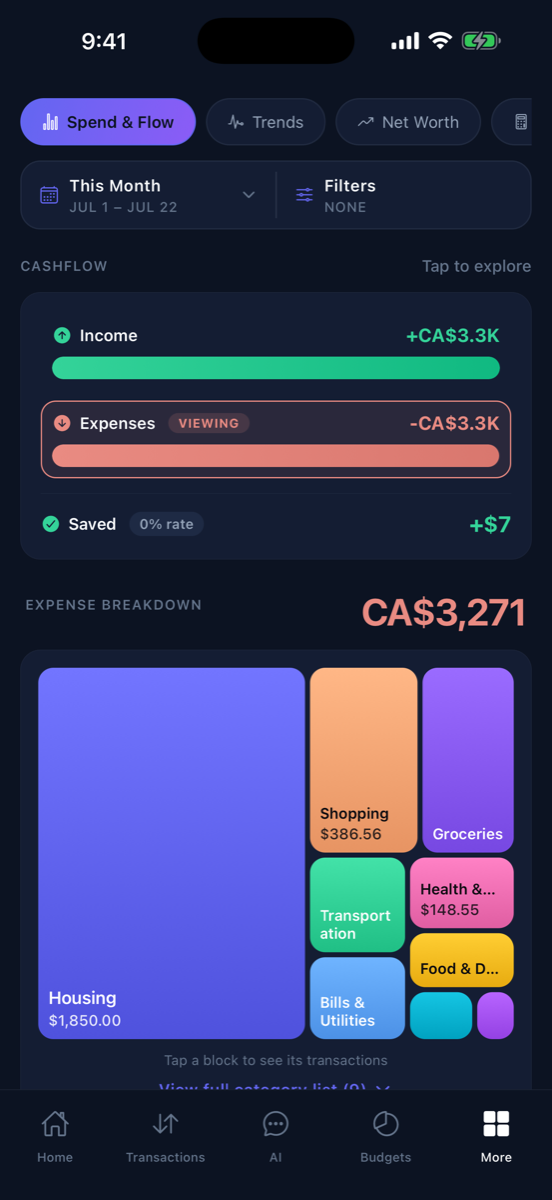
The Spend & Flow report shows income against expenses and what you saved, then breaks every dollar of spending into a treemap you can tap to explore. Big blocks are big spending — no pie-chart squinting required.
- Cashflow view: income, expenses, and savings rate for any period
- Tap any category block to see its transactions
- Trends and net worth reports one tab away

Accounts: every balance in one place
Chequing, savings, credit cards, TFSAs, RRSPs, 401(k)s — link them through Plaid and they stay in sync. Accounts your bank can't connect? Add them manually and they count toward your net worth all the same.
- Grouped by cash, credit, and investments with live balances
- Manual accounts for anything Plaid can't reach
- USD and CAD accounts combine into one real net worth number
Recurring: catch the subscriptions you forgot
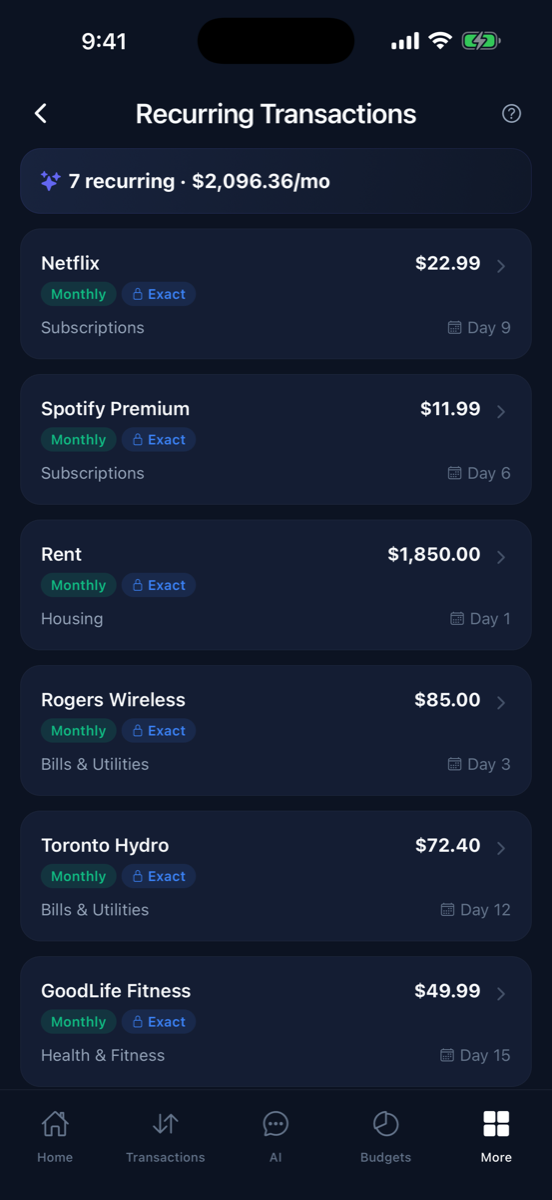
Sable detects your recurring charges automatically and adds them up into one number — what your subscriptions and bills really cost you per month. Most people find at least one charge they'd forgotten about.
- Auto-detected subscriptions, bills, and rent with due days
- One total: exactly what recurs every month
- Spot price creep when a subscription quietly goes up
Net worth forecasting: see your future number
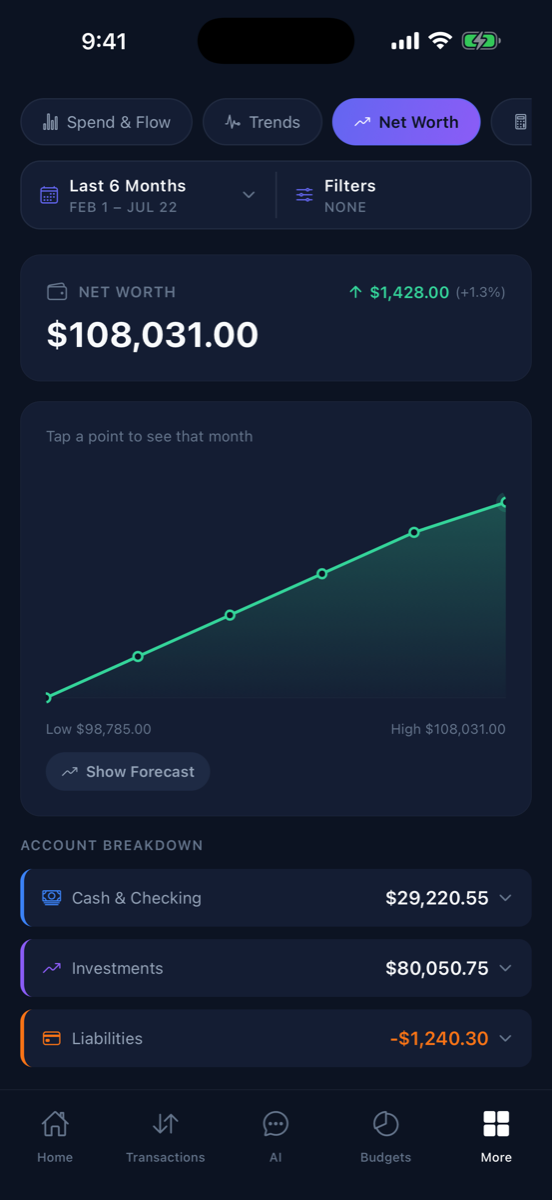
The net worth report charts your history — then the forecast projects it forward. Tap Show Forecast, pick a horizon from one year to ten and beyond, and watch what your current savings rate turns into. It told one of us the actual month we'd hit our house down payment.
- Net worth history with account-type breakdown
- Forecast horizons: 1 year, 5 years, 10 years, max
- Built from your real balances, goals, and savings rate
Zakat calculator: your obligation, auto-filled
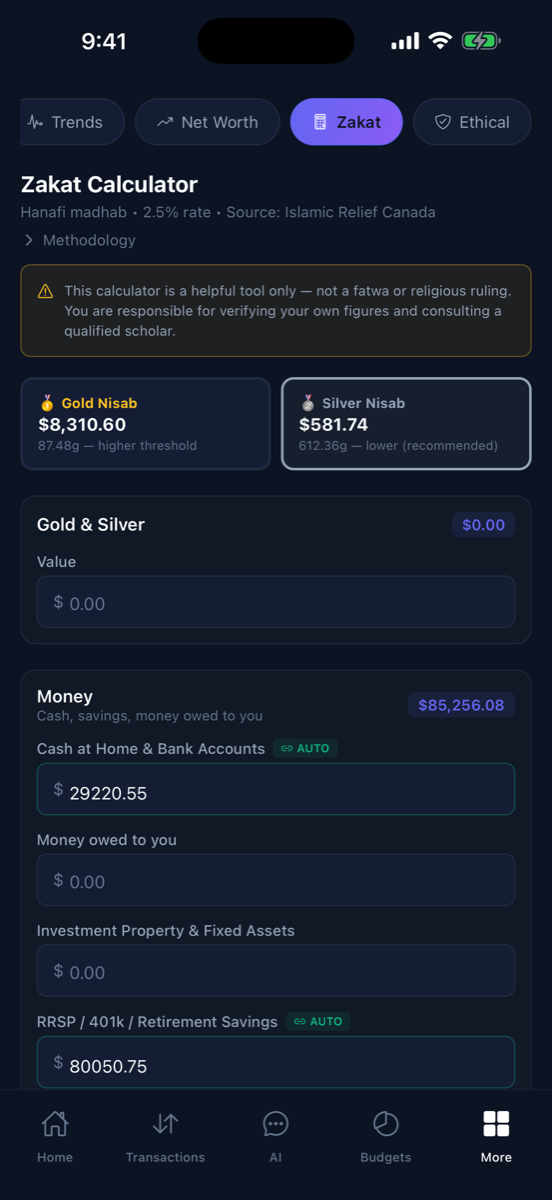
For Muslim users, Sable pulls your cash and investment balances straight into a zakat calculator with live gold and silver nisab thresholds. Fields that can auto-fill from your accounts do; everything else you can enter by hand. Optional — and off unless you want it.
- Live gold and silver nisab from current prices
- Auto-fills cash, savings, and retirement balances from your accounts
- Clear methodology — a helpful tool, not a fatwa
That's the tour. Want to try it yourself?
Free to start on the web or iOS — no credit card. The whole setup takes about two minutes.
Get Started Free